
CLI
The hostwright command surface — what each command is intended to do, and which are read-only versus mutating.
The hostwright command line is the primary way you interact with the control
plane. This page documents the intended command surface.
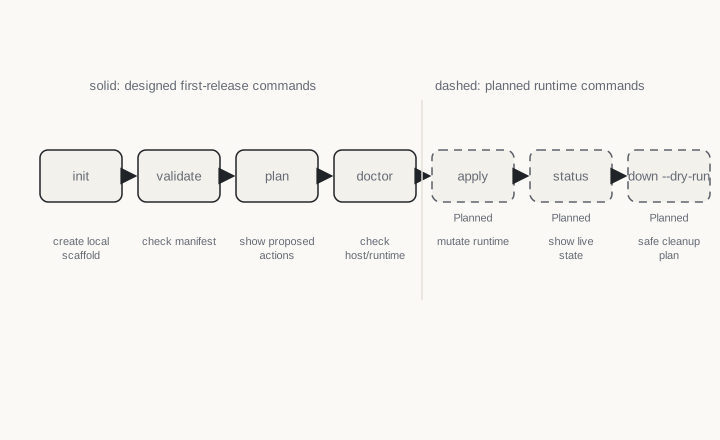
Commands
| Command | Mutating? | Purpose |
|---|---|---|
hostwright init | writes files | Create a hostwright.yaml and project metadata. Does not overwrite without confirmation. |
hostwright validate | read-only | Check the manifest against the schema and semantic rules. |
hostwright doctor | read-only | Report host, macOS, architecture, and Apple container readiness. |
hostwright plan | read-only | Show the ordered runtime actions that apply would take. |
hostwright apply | mutating | Validate, compute a plan, persist intent, and apply idempotently. |
hostwright status | read-only | Show desired vs actual state, health, drift, restarts, and ports. |
hostwright logs | read-only | Fetch or stream service logs, honest about runtime limits. |
hostwright restart | mutating | Restart a service or project per policy and record an event. |
hostwright down | mutating | Stop project resources per ownership rules; preserves named volumes by default. |
hostwright clean | mutating | Remove stale, owned resources. Dry-run first. |
Read-only first
The commands you reach for while iterating — validate, plan, doctor,
status, logs — never change runtime state. You can run them freely.
Destructive commands
down and clean can remove resources, so they default to safe behavior:
hostwright down --dry-run        # preview what would stop
hostwright clean --dry-run       # preview stale, owned resources
hostwright clean --confirmed     # remove safe, stale, owned resources only
hostwright clean --volumes       # requires explicit confirmation; lists every named volume
Cleanup only ever touches resources Hostwright can prove it owns. See the safety model.
Related
hostwright.yamlreference- Reconciliation — what
planandapplyactually do. - Limitations